

How SafeProp Works?
It works in three simple steps:

Add your property details and documents
-
User Information
Enter your Name (as per the PAN Card), Registered mobile number, Property Nickname, Click Save and Submit. -
User Information
Enter your Name (as per the PAN Card), Registered mobile number, Property Nickname, Click Save and Submit. -
User Information
Enter your Name (as per the PAN Card), Registered mobile number, Property Nickname, Click Save and Submit. -
User Information
Enter your Name (as per the PAN Card), Registered mobile number, Property Nickname, Click Save and Submit. -
User Information
Enter your Name (as per the PAN Card), Registered mobile number, Property Nickname, Click Save and Submit. -
User Information
Enter your Name (as per the PAN Card), Registered mobile number, Property Nickname, Click Save and Submit.

Review your Property
Review all property details and uploaded documents carefully. Click Submit to send them to the SafeProp team for verification.

Get Verified Property Report
SafeProp team will review the documents and getback within 48 hours. In case if any document has errors, you’ll receive an email from the SafeProp team to re-upload. And, if the uploaded documents are proper, you will receive an email with the property report.
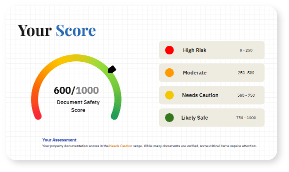 Property Report